THE SAFE CHOICE FOR
INDUSTRIAL MEMORY AND DATA SECURITY

Be the first to see Datakey’s new Mini-Bar at Electronica, Munich in Hall 5, Booth C176!

eMMC vs SSD: which to use, where and why

Emmc Vs Ssd: Which To Use, Where And Why

The eMMC vs SSD decision comes down to three things: how much data your design needs to hold, how quickly it has to move that data, and how much board space and budget you can give up to get there. Both are solid state, both use the same NAND flash underneath, and both will outlast a spinning disk in anything that vibrates. What separates them is packaging, controller class and interface, and that is where the right answer for your application lives.

This guide covers what each technology actually is, where the performance gap shows up in a real embedded system, what quietly slows an eMMC down once it is in the field, and what to confirm before you commit a footprint to a board.

The short answer

Specify eMMC when your design needs modest capacity, very little board area and a lean bill of materials, and specify an SSD when you need higher capacity, sustained throughput or storage you can replace without a redesign.

eMMC is a memory chip with its own controller, soldered directly to your PCB. An SSD is a drive with a larger controller, more NAND devices working in parallel and a standard interface. Plenty of platforms carry both, an eMMC holding the operating system and a separate SSD taking the data.

What eMMC actually is

eMMC is embedded MultiMediaCard, and it is the surviving branch of a card format that has otherwise disappeared.

MMC arrived in 1997 as a compact removable card for digital cameras, mobile phones and PDAs. The Secure Digital format followed in 1999, developed alongside the Secure Digital Music Initiative so that cards could support digital rights management, and SD went on to displace MMC almost entirely in removable media. The underlying technology carried on in embedded form.

The Joint Electron Device Engineering Council defines eMMC as a non-volatile memory system that combines flash memory with a flash memory controller in one package, which simplifies the host interface and takes low-level flash management away from the host processor. In practice, that is the whole appeal. You are not writing wear levelling, bad block management or error correction into your own firmware, because the controller in the package handles it. The current electrical standard is eMMC 5.1, published by JEDEC as JESD84-B51A in January 2019.

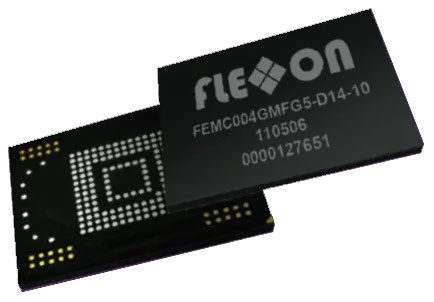
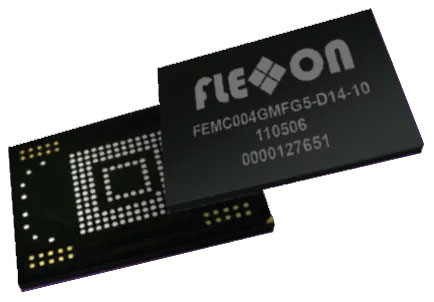
Physically, eMMC is an IC rather than a card. It is supplied as a BGA package for surface mounting, and occasionally as a bare die, so it is soldered down with nothing to work loose under shock or vibration and nothing an operator can remove.

Capacities typically run from a few GB to a few hundred GB. The Flexxon eMMC AXO series reaches 512GB using 3D TLC, which you can read more about in the 3D NAND section of our guide to NAND memory. Most embedded systems need nothing like that, which is exactly why eMMC has stayed relevant.

What an industrial SSD gives you instead

An SSD gives you more capacity, more speed and the option to replace the storage without touching the board.

Capacities usually start around 128GB and run into terabytes. Interfaces are SATA or PCIe NVMe, in familiar formats such as 2.5-inch, M.2 and mSATA. A drive controller has more channels to work across, more spare area to manage and more sophisticated wear levelling than a chip-scale controller can offer, and you can see the full range on our industrial SSD pages.

That extra capability costs money, board space and a connector, which is precisely why eMMC still wins so many designs.

eMMC vs SSD at a glance

eMMCSSD
Typical capacityA few GB to a few hundred GB128GB to several TB
Sequential readUp to 250 MB/s on eMMC 5.1Around 500 MB/s on SATA III, considerably higher on PCIe NVMe
Sequential writeUp to 125 MB/s on eMMC 5.1Around 500 MB/s on SATA III, considerably higher on PCIe NVMe
InterfaceEmbedded eMMC busSATA or PCIe NVMe
Physical formatBGA package soldered to the PCB2.5 inch, M.2, mSATA and other drive formats
Replaceable in the fieldNo, it is a board-level changeYes, in most designs
Wear levelling and spare areaManaged by the on package controllerManaged by a larger drive controller with more spare area
Board space and costMinimal on both countsHigher on both counts

Figures for eMMC 5.1 and SATA III are indicative maximums. Always take the numbers for the specific part from its datasheet.

Speed, and where the difference actually shows up

The headline gap is real, but it rarely limits an embedded design in the way engineers expect.

An eMMC 5.1 device will do sequential reads at up to 250 MB/s and sequential writes at up to 125 MB/s. A SATA III SSD sits around 500 MB/s, and PCIe NVMe moves into a different class again, with the exact figure depending heavily on the drive you specify.

What actually determines whether your system feels quick is usually not sequential throughput. It is small random writes, and most industrial applications generate a lot of them. Event logging, database journaling, configuration writes and telemetry all hit storage in small blocks, and that is the workload where a stronger controller and deeper parallelism pull ahead. Boot time, firmware update time and how long a log flush blocks the application are the numbers your users will notice.

Michael recommends. Work out what your application writes in a day before you look at a single read speed. The figures everyone quotes are sequential, but it is the constant trickle of small log writes that decides how the storage behaves in year three, and that is the number most specifications arrive here without.

Capacity, endurance and why headroom is worth paying for

Endurance is driven far more by the type of NAND cell inside the device than by whether that device is an eMMC or an SSD.

SLC, pSLC, MLC, TLC and QLC all trade cost per GB against write endurance and speed, and our guide to NAND memory sets out where each one lands. A well-specified eMMC will comfortably outlive a poorly specified SSD.

Whichever you choose, specify more capacity than your data needs. A device that runs close to full gives its controller fewer free blocks to work with, so wear levelling and garbage collection have less room to move and both endurance and sustained write performance suffer. Buying headroom at design stage is the cheapest reliability improvement available to you, and it costs a great deal less than a field failure.

What quietly slows an embedded eMMC down

If a device felt fast on the bench and feels slow in service, the cause is usually one of these.

  • How full it is. Storage that is close to capacity leaves the controller very little spare area, which drags sustained write performance down and accelerates wear.
  • Fragmentation over time. As files are written, deleted and rewritten, data ends up scattered, and retrieval takes longer. Defragmentation tools designed for spinning disks do not help here and can add unnecessary writes, so check whether the device manufacturer offers its own optimisation guidance instead.
  • Background writes you forgot about. Logging daemons, watchdog processes, telemetry uploads and automatic updates all compete for the same storage. Disabling what the application does not need frees up real headroom.
  • Controller and device class. The controller is the brain of the package, and two devices with identical capacity can behave very differently under the same load.
  • Capacity and parallelism. Larger devices often have more NAND dies to interleave across, so a bigger part can be genuinely faster as well as longer-lived.
  • Temperature. Sustained heat and hard cold both affect performance and lifespan, which is the main reason a commercial-grade part specified for an office environment struggles in an unheated cabinet.
  • Firmware version. Manufacturer firmware updates carry real performance and stability fixes, so confirm what your part is running before you start chasing a problem elsewhere.

Michael recommends. Benchmark a sample with your own workload rather than trusting a sequential figure from a datasheet. An application writing small log entries all day behaves nothing like the test that produced the headline number, and a sample tells you that in an afternoon.

When to specify eMMC

Choose eMMC when the design is space constrained, cost sensitive and needs somewhere between a few GB and a few hundred GB.

It suits systems where the storage holds firmware, an operating system, calibration data or a bounded volume of logs, and where nothing needs to be removed or upgraded in service. Because it is soldered, it also removes a connector, which is one fewer thing to fail in a high vibration environment and one fewer route for anyone to walk off with your data. If the data itself needs protecting rather than just the port, that is a separate conversation, and the Flexxon security range covers write-once and encrypted media options.

When to specify an SSD

Choose an SSD when capacity, sustained throughput or serviceability matter more than board space and unit cost.

High-resolution video capture, industrial imaging, data logging at volume, edge analytics and anything running a real database all point at a drive rather than a chip. So does any application where the storage may need replacing during the product life without a board change. Our Flexxon SSD range covers both SATA and NVMe options built for industrial duty.

Industrial grade matters more than the format you pick

The eMMC vs SSD choice will not save you if the part underneath is a commercial one.

Commercial memory is built for a benign environment, a predictable duty cycle and a short product life, and it is usually the first thing to fail when a design goes into a vehicle, a cabinet or a field enclosure. Industrial-grade parts are specified for wide operating temperature, shock and vibration, unexpected power loss, a fixed bill of materials and long-term availability, and that last point protects you from a redesign you never budgeted for. Rugged and long-lasting are not brochure words here; they are the test conditions the part has passed and the supply commitment that keeps your bill of materials intact.

Flexxon eMMC is used across industrial and automotive systems, including navigation, drive recorders and vehicle infotainment, where it has to hold up in genuinely harsh conditions. That is the same reliability problem you will recognise from any transportation application that logs data on the move. You can read Flexxon’s own overview of its automotive grade eMMC for the details. Nexus is the appointed Flexxon partner across the UK, Ireland, Germany, Switzerland and Austria, and we are one of very few suppliers still offering the 100-ball eMMC configuration, which matters a great deal if you are supporting a legacy platform.

Michael recommends. Confirm the ball count and package outline with your layout engineer before you approve a part. A footprint change late in the day is a board respin rather than a purchasing decision, and we would much rather have that conversation early.

What to check before you commit

  • The operating temperature range your enclosure actually reaches, not the ambient specification for the site.
  • Your realistic daily write volume, including logs and background processes.
  • The NAND cell type and what that means for endurance across the product life.
  • Capacity headroom, allowing room for the data to grow.
  • Package outline and ball count against your layout.
  • Long-term availability, and whether the manufacturer has committed to a supply roadmap that matches your product life.
  • Benchmark results from a sample running your workload.

If you would rather work through that list with someone who has specified these parts before, that is exactly what our applications engineering support is for.

Frequently asked questions

Is eMMC just a slower SSD? No. They share the same underlying NAND flash, but an eMMC is a single package with an embedded controller designed for compact, low-power designs, while an SSD is a drive with a larger controller and more parallelism. eMMC is slower in raw throughput, but it is the right answer for a large number of embedded applications.

Can I swap an eMMC for an SSD later if I need more capacity? Not without a design change. eMMC is soldered to the board, so moving to a drive means adding an interface, a connector and space for it. If there is any realistic chance you will need to scale capacity later, plan for it at the design stage rather than after production.

Does a larger eMMC really perform better than a small one? Often, yes. Higher capacity devices tend to have more NAND dies for the controller to interleave across, and they give wear levelling more spare area to work with. It is a common reason two otherwise identical designs behave differently.

What about UFS, should I be waiting for it? UFS is a faster embedded storage standard, and it is worth knowing about, but availability, long-term supply commitments and host support all need checking against your platform before it becomes the obvious choice. Talk to us about where it currently fits.

Which one survives a harsh environment better? Whichever one is specified for that environment. A soldered eMMC removes a connector, which helps under vibration, but the decisive factors are the temperature rating, the NAND type and whether the manufacturer built the part as a rugged industrial device in the first place, not the format.

Talk it through before you design it in

The fastest way to get this right is a short conversation about the application rather than a longer search through datasheets. Get in touch with the Nexus team with your temperature range, your write volume and your available board space, and you will get a straight answer from someone who has specified this before.

If you already know eMMC is the right format for your design, the Flexxon eMMC range is the place to start. If you are earlier in the process and want to test something first, you can request a Flexxon sample and benchmark it against your own workload.

Share this:

FREE comparison guide – EEPROM Vs Flash Memory

Request Product Sample

PRODUCT Brochure

"*" indicates required fields

Name*

By submitting this form, you agree to Nexus sending you occasional details about our goods and services, and other value-added information.
For more details, please see our Privacy Notice.